
“Build a reminder app” sounds like a straightforward request. But before writing a component, someone needs to decide what happens when the page closes, whether reminders survive a refresh, and how to prove a notification actually reached the desktop.
These are different kinds of work. In this example, I used a team of custom agents in GitHub Copilot: Analyst, PM, UX-Designer, PO, Architect, Dev, and QA, coordinated by a Project Orchestrator. The resulting project is Moment, a personal reminder web app.
This post explains how the team is organized, how an idea moves between roles, and what the reminder app demonstrates. The important part is not having eight conversations at once. It is giving each agent a bounded responsibility, passing explicit artifacts between them, and keeping the user in control of decisions.
What Makes This an Agent Team?
A custom agent combines instructions with the tools available in its execution environment. A skill supplies a reusable workflow that an agent can load. In this setup, the specialist agent files are small entry points into installed BMAD skills; the orchestrator supplies the coordination rules.
The distinction matters:
- A role says who owns a task.
- A skill explains how that role performs its work.
- An artifact preserves the result outside a conversation.
- The orchestrator manages dependencies, approvals, and the next handoff.
- The user approves scope, resolves material decisions, and accepts delivery.
This is not a permanent group chat with shared hidden memory. Specialists receive self-contained assignments through native subagent delegation and return their results to the orchestrator. Context has to be handed over deliberately.
The default flow in my orchestrator is:
1 | Idea |
An existing project does not need to repeat every stage. A well-specified bug can go directly to Dev. A prototype with unresolved requirements should not.
Give Each Agent a Clear Boundary
The agents in this setup have the following responsibilities:
| Agent | Main responsibility | Useful deliverable |
|---|---|---|
| Analyst | Clarify the problem, users, assumptions, and unknowns | A brief with open questions separated from confirmed facts |
| PM | Define outcomes, priorities, scope, and exclusions | A product requirements document, or PRD |
| UX-Designer | Define appearance, journeys, interactions, and states | DESIGN.md, EXPERIENCE.md, and a prototype where useful |
| Architect | Define boundaries, contracts, technical constraints, and trade-offs | An architecture document that constrains implementation |
| PO | Turn approved inputs into implementable work | Epics and stories with acceptance criteria and dependencies |
| Dev | Implement approved work and verify the change | Working code, appropriate unit/integration tests, and exact check results |
| QA | Add end-to-end or API coverage for existing working features | Automated scenarios, results, and remaining coverage gaps |
| Project Orchestrator | Maintain continuity and coordinate approved handoffs | Progress, decisions, conflicts, and acceptance evidence |
PM and PO are not interchangeable here. PM answers “What should this product achieve?” PO answers “What is the next implementable piece, and how will we know it works?”
Likewise, Dev does not hand all testing to QA. Dev verifies the behavior being introduced. QA adds broader user-journey or API coverage once the feature works. Defects go back to Dev through an approved handoff.
Configure the Agents in Copilot
Agent files and prerequisites
My agents are stored in the user-level Copilot agents folder. On Windows, you can inspect that location with:
1 | Get-ChildItem "$HOME\.copilot\agents" -Filter "*.agent.md" |
The relevant files are:
1 | Analyst.agent.md |
For agents shared with a repository, VS Code also supports the workspace location .github/agents. Locations, supported fields, and tool names depend on the selected harness; check the current custom agent file reference.
Before trying the workflow, you need:
- A working GitHub Copilot environment with the custom agents visible.
- Native subagent delegation available in the selected session.
- The BMAD skills referenced by the specialist agents installed and readable.
- The project’s required BMAD configuration, set up with your approval.
- Project build and test tools available to the roles that need them.
An agent file is not an installer. Copying a wrapper that refers to a missing skill does not create that capability.
A specialist entry point
The following is a shortened, portable example of the pattern used by the Dev agent, not a complete BMAD installation:
1 | --- |
The actual local wrappers identify the installed skill location explicitly. Adapt that location rather than copying another developer’s absolute path.
I have omitted model and tool fields from this example deliberately. Configure tool access for your harness and verify that the running agent can perform its assigned work; a role name alone does not grant capabilities. See VS Code’s custom agent guide for creation and verification steps.
The orchestrator’s essential instructions
The orchestrator is more than “ask the other agents to build an app.” Its key rules can be summarized as:
1 | --- |
This is a design sketch of the inspected configuration. It is not a claim that Markdown instructions enforce permissions mechanically. Tool restrictions, runtime behavior, and human review still matter.
The local orchestrator uses native delegation rather than depending on editor-specific handoff buttons. Do not assume a handoffs or agents configuration from another harness is portable; the harness compatibility reference explains the differences.
Start with an Idea, Not a Giant Implementation Prompt
For a reminder app like Moment, a useful starting prompt would be:
1 | Use the Project Orchestrator workflow in the current reminder-app workspace. |
The prompts in this post are reusable examples, not transcripts of the original development session.
The reminder app’s initial brief illustrates why discovery helps. It recorded the page-close behavior as confirmed, while persistence, notification presentation, and several recurrence rules were still assumptions.
Those questions have architectural consequences:
- Does “stop” mean stop new notifications, or remove old notifications from the operating system too?
- Should reopening replay reminders missed while closed?
- Does a monthly reminder on the 31st move to the last day of a shorter month?
- Can two tabs both run the scheduler?
- Does browser permission mean the user actually saw a notification?
If these questions remain implicit, different agents can produce individually reasonable but incompatible answers.
Review the decision, then authorize the next step
An approval should identify both the accepted result and the next task. For example:
1 | Approve the brief with these decisions: |
The orchestrator’s default is a review gate after each result, not unattended execution of the whole pipeline. If a batch is desired, authorize its scope and limits explicitly. Moment’s later implementation plan records a user-approved batch for the remaining MVP work; that was a specific decision, not an assumption that all future work was authorized.
Use Artifacts as the Handoff Contract
The reminder project preserves its planning and implementation evidence under this structure:
1 | reminder-app/ |
These are inspected project artifacts, not a universal directory convention. The formal initiative contains requirements R1-R14, constraints, and completion conditions. The architecture maps decisions back to those requirements. The tickets and shared implementation plan connect the approved scope to delivery.
The intended workflow includes a PM requirements stage; this example’s durable formal requirements are in the initiative and scope-decision artifacts. A standalone file named PRD.md is not necessary to explain the evidence, and should not be invented.
For a new project, a handoff should be explicit enough that the recipient can work without the previous conversation:
1 | Role: Dev |
After interruption, the orchestrator should resume from recorded approvals and verified artifacts. A file’s existence, or even a final label in one document, does not prove that every dependent decision has been approved.
The Example Project: Moment
Moment is a Chinese-language, desktop-first reminder workspace built with React, TypeScript, and Vite. Its local persistence uses IndexedDB through idb; recurrence calculations use @js-temporal/polyfill.
The working app supports:
- Date reminders with one-time, monthly, or yearly recurrence.
- Daily interval reminders within a configured time window.
- Advance reminders and a preview of the actual reminder time.
- Editing, pausing, resuming, deleting, searching, and filtering.
- Local persistence without an account or cloud synchronization.
- Explicit notification permission and failure states.
- A single running page, with additional pages kept read-only.
The screenshots below were captured from the actual local application for this article, using fictional reminders in a fresh browser session. They are not images of the earlier UX prototype, and they contain no personal reminder data.
The workspace: design carried into implementation
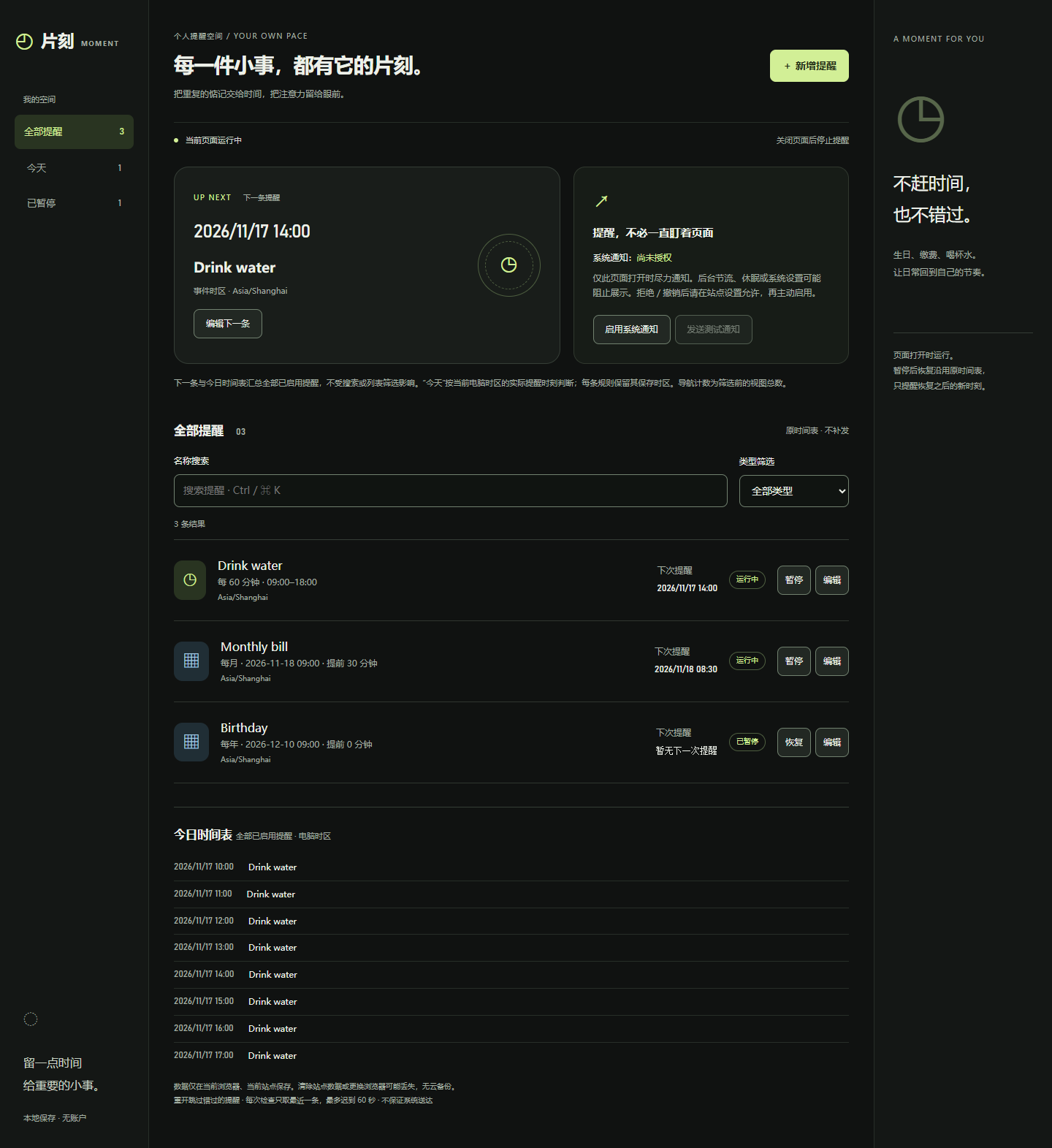
The dark workspace, lime primary action, next-reminder card, and status labels follow the design direction preserved in the UX artifacts. The screenshot shows two active reminders and one paused reminder.
Notice the operational information as well as the styling: the page says reminders stop after closing, system notifications are not yet authorized, and data belongs to the current browser and site. Those are product boundaries made visible in the interface.
For this capture, the fictional reminders were created through the UI, the birthday reminder was paused, and the page was reloaded. The records and paused state remained visible.
The editor: a requirement becomes visible behavior
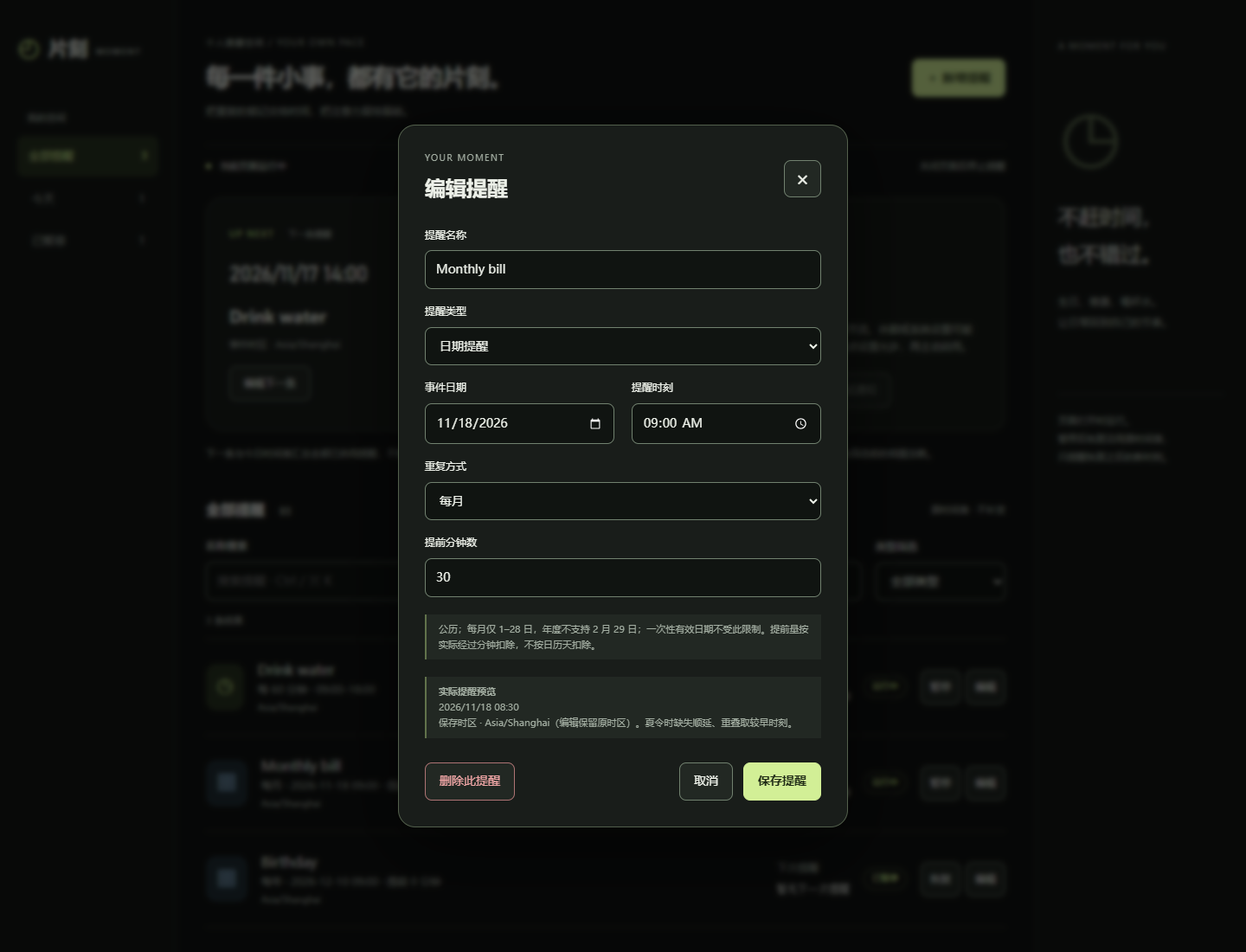
The monthly bill is configured for 09:00 with a 30-minute advance. Its actual reminder preview is therefore 08:30. This is a useful acceptance check because the editor, list, and scheduler must agree on one calculation.
The architecture requires a shared recurrence engine rather than separate UI and scheduler implementations. It also makes first-release limitations explicit: monthly recurrence supports days 1-28, yearly February 29 recurrence is excluded, and interval windows do not cross midnight.
These are scoped product decisions, not general limitations of React or browser reminders.
A second page: architecture is more than a diagram
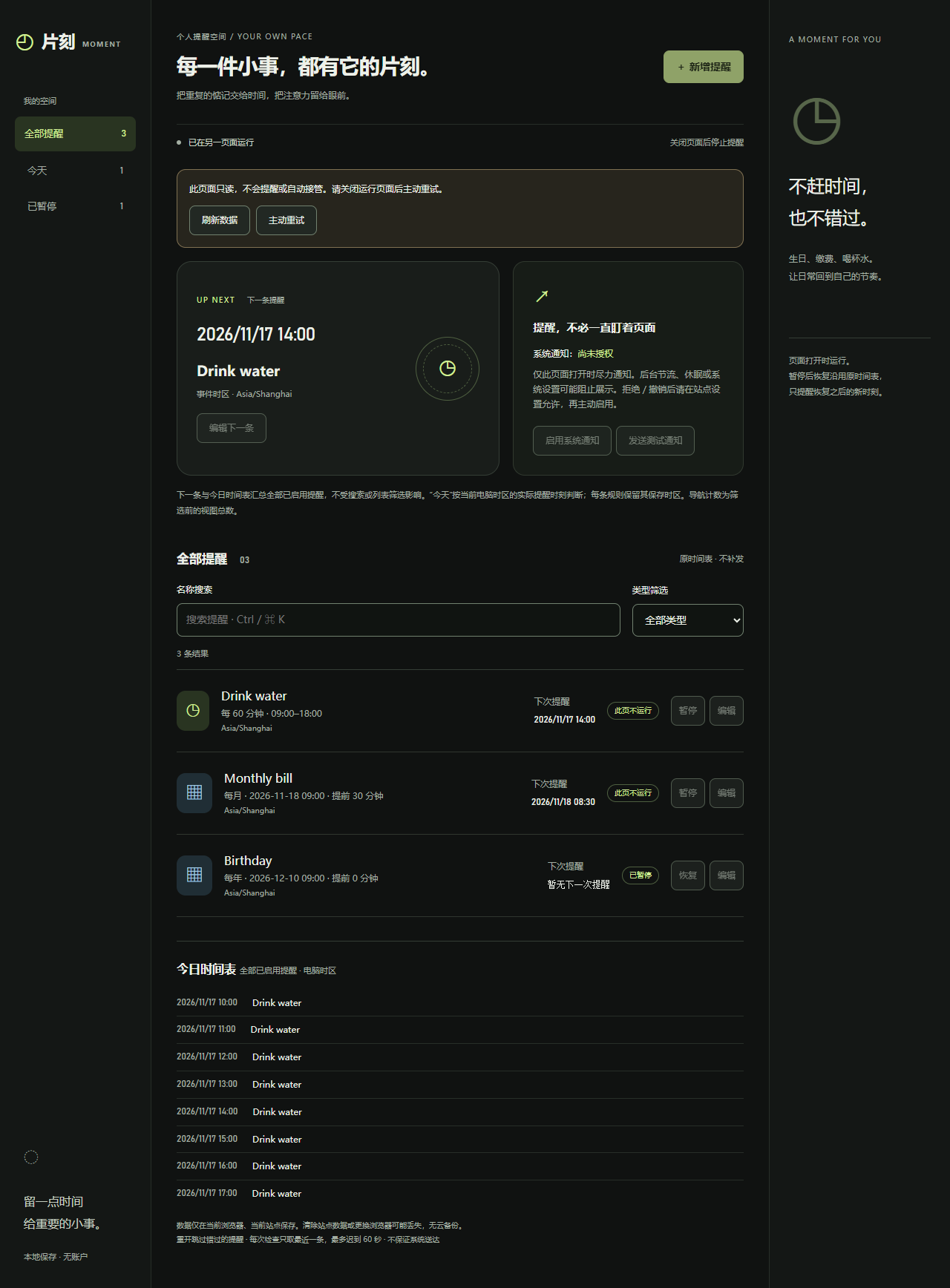
This screenshot was captured by opening a second page in the same browser context while the first page remained open.
The second page displays the “already running in another page” state and disables editing. The architecture uses an exclusive same-origin Web Lock so two pages do not both edit and issue reminders. The read-only page offers an explicit retry rather than silently taking over.
That connects several roles: Architect defines ownership, UX explains the state, PO makes it testable, Dev implements it, and browser coverage checks the interaction.
One rule traced from idea to test
Consider “remind me to drink water every hour”:
| Stage | Concrete result in this example |
|---|---|
| Discovery | A daily interval reminder is needed, but start/end semantics need confirmation |
| Requirements | A positive interval, valid daily window, pause/resume behavior, and no replay are explicit |
| UX | The editor explains when the first reminder occurs and previews the next one |
| Architecture | One pure recurrence engine serves preview, list, and due-time checks |
| Story acceptance | For 09:00-18:00 with a 60-minute interval, reminders occur at 10:00 through 17:00 |
| Verification | Check excluded endpoints, invalid windows, pause/resume, persistence, and page lifecycle |
For this rule, 09:00 is the anchor, not the first reminder, and 18:00 is excluded. Without that contract, a plausible implementation could still be wrong.
Parallelize Independent Work, Not Every Role
UX and architecture are natural candidates for parallel work after requirements approval. Both consume the same scope, but produce different artifacts:
1 | Approved requirements |
The join is essential. The reminder artifacts record a concrete reconciliation: earlier page-only notification assumptions were updated to support system notifications while the page is alive, without introducing closed-page push.
That decision affects the architecture, permission UI, acceptance criteria, implementation, and tests. The orchestrator must propagate it rather than letting each role continue with an older interpretation.
Not every task can run concurrently. Two agents editing the same application state module are likely to create integration work. QA coverage that depends on an unfinished UI contract should wait. If the harness cannot execute tasks concurrently, run them sequentially and say so.
For Moment, the approved remaining-MVP plan explicitly used one implementation lane. A multi-agent team does not require multiple agents writing code simultaneously.
Separate Working Code from Final Acceptance
The app’s recorded implementation evidence includes the following results from its October 23, 2026 local verification:
| Check | Recorded result |
|---|---|
| Lint and TypeScript checks | Passed |
| Unit tests | 61 passed across 8 files |
| Development-server browser suite | 20 passed |
| Production-build browser suite | 20 passed |
| Separate real back/forward-cache restoration test | 1 passed |
| Production build | Passed |
These figures come from the project’s shared implementation plan; they were not rerun as part of writing this article. The fresh browser walkthrough for the screenshots checked creation, pause persistence after reload, the editor, and the second-page read-only state. It was not a replacement for the full suite.
The distinction is especially important for notifications. A successful Notification() call, or a mocked API assertion, does not prove that Windows displayed a banner.
The project README records an initial user-observed Chrome notification success, but the complete R14 acceptance requirement remains outstanding: record the actual Windows Chrome and Edge versions and observe three consecutive reminders in each target browser within the agreed 60-second foreground window, without duplicates.
The architecture also acknowledges that claiming an occurrence before presenting it can lose a notification if the page crashes between those operations. Deduplication is not a guarantee of exactly-once delivery or that a user read it.
So the accurate conclusion is: Moment has a working implementation and recorded automated evidence, with final target-browser notification acceptance still pending. “The last agent finished” is not a sufficient completion criterion.
Run the example locally
From the existing reminder-app checkout, the project documents:
1 | npm ci |
Its configured manual-preview address is http://localhost:5175, with strict port binding. Reuse the same origin when checking saved data: changing the hostname or port gives the browser a different storage and permission boundary.
For an existing installation with dependencies already present, start with npm run dev. The example’s validation commands include:
1 | npm run lint |
Use the project’s README and lockfile for its environment requirements. Its automated browser tests use the separate localhost:5174 origin to avoid touching manual-use data. Do not stop another project’s server or reuse a personal browser profile just to run a demo.
Static hosting does not turn this application into a background reminder service. Closing the running page stops new reminders; reopening retains local records but skips missed occurrences. Deployment is a separate authorized operation, not an automatic consequence of successful tests.
Practical Lessons for Your Own Agent Team
Start with fewer roles if the task is small, but keep the same discipline:
- Approve behavior before implementation. Unanswered product questions do not disappear when several agents are involved.
- Pass exact artifacts and revisions. Avoid handoffs that only say “use the previous agent’s output.”
- Give every delegation a stopping condition. Otherwise one role may continue into another role’s unapproved work.
- Reconcile parallel results. Shared inputs do not guarantee compatible outputs.
- Keep one owner for progress and integration. The orchestrator coordinates; specialists own bounded deliverables.
- Ask for evidence, not completion language. Record commands, results, observed behavior, and what remains unverified.
The trade-off is real: extra artifacts, review gates, and agent calls consume time and context. For a small typo fix, this workflow would be excessive. For an idea with uncertain behavior, UI decisions, browser constraints, and acceptance requirements, the structure helps prevent an attractive demo from being mistaken for a finished product.
Moment makes the central lesson concrete: an agent team works through explicit contracts and verified handoffs, not through the number of agents you launch.